



 Partners




 Download
 Buy
BuySQL Maestro for MySQL online help
| Prev | Return to chapter overview | Next |
Confirmations

Use this tab to manage application confirmations.
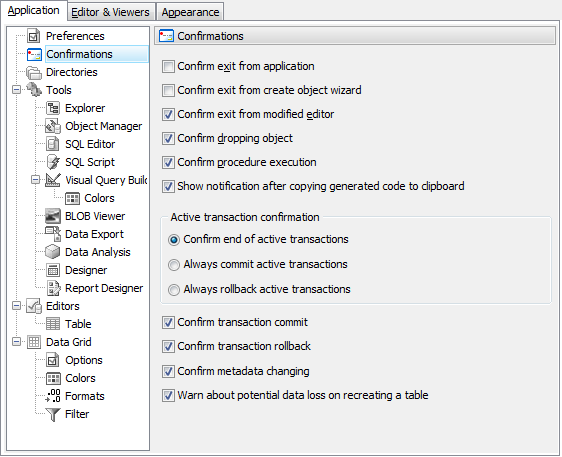
 Confirm exit from Create Object Wizard
If this option is checked, the program requires confirmation each time you want to exit the Create Object Wizard.
Confirm exit from modified editor
If this option is checked, the program asks you to confirm exit from the editor, if you have made any changes.
Confirm dropping object
If this option is checked, the program requires confirmation for dropping database object.
Confirm exit from application
If this option is checked, the program requires confirmation when you want to exit <%PRODUCT_NAME%.
Transaction confirmation
Select whether you will be prompted to commit or rollback active transaction or SQL Maestro for MySQL will commit or rollback transactions without asking.
Confirm metadata changing
If this option is checked, the program requires confirmation for changing metadata.
| Prev | Return to chapter overview | Next |