





Choose your database:
AnySQL
MySQL
MS SQL Server
PostgreSQL
SQLite
Firebird
Oracle
SQL Anywhere
DB2
MaxDB

Subscribe to our news:
Partners
Testimonials
Rati Dzidziguri: "I'm working on development of ERP and CRM software and during the process of creation of those products I have tried lots of solutions by the only solution I would call as an user friendly professional and with many other epithets is MySQL Maestro and all Maestro toolkits".
Torstein Krogh: "Some time ago, I tested all available tools on the market for maintaining MySQL and MySQL Maestro came up on top. My opinion is that MySQL should offer it as a free tool for all paying customers! They have nothing today, and doing MySQL DOS commands is not getting any new customers".

More

Add your opinion

SQL Maestro for MySQL online help

Prev Return to chapter overview Next

Create Database Object Dialog

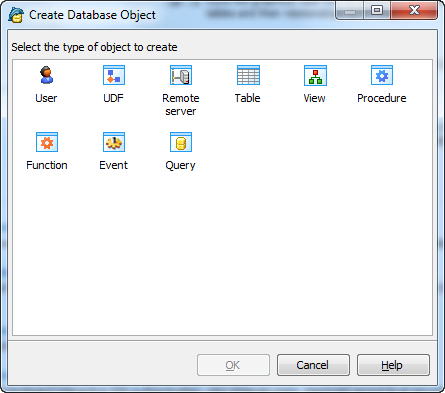
The Create Database Object dialog allows you to create any type of database object supported by SQL Maestro for MySQL. To open the dialog select the Object | Create Database Object... main menu item or use the Shift+Ctrl+N hot keys combination. Select an object type icon and click the OK button to invoke the corresponding wizard or dialog.


Prev Return to chapter overview Next