Subscribe to our news:

 Partners
Testimonials
Daryl Joubert: "I am evaluating your PostgreSQL Maestro product for purchase by my company and thus far I am very impressed! I really like the easy, intuitive and productive user interface and feature set. I am also evaluating a number of other products for PostgreSQL database design and maintenence but thus far SQLMaestro stands head and shoulders above the rest".
Simon Pills: "Someone finally invented an intuitively used and easily customized PostgreSQL database administration tool! Keep up the good work. I will be in touch. I am able to do this horrendous work because your software enabled me to create a new database with all necessary objects in several minutes! I am sure that I have found what I really need".
More
Add your opinion
Customers
|
PostgreSQL Maestro online Help
Extract Database
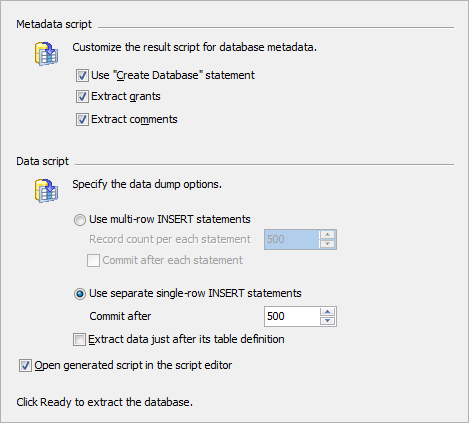
Using Extract Database Wizard you can extract database objects and data to a SQL script, e.g. for backup purposes. To run this wizard select the Tools | Extract Database main menu item.
Use the More... button to save the extract configuration for future use or to load the previously saved configuration for faster extract.
See also: Get SQL Dump Wizard
|
Company news 
Sep 26, 2025
New version comes with PostgreSQL 18 compatibility, introduces support for virtual generated columns, named NOT NULL constraints, NOT VALID property for NOT NULL constraints, NOT ENFORCED property for check and foreign key constraints and some other enhancements.
Sep 26, 2025
All software of our PostgreSQL family come now with PostgreSQL 18 compatibility.
Sep 30, 2024
New version comes with PostgreSQL 17 compatibility, upgraded SSH client and some other enhancements.
Resources
This article discloses the ways of role management provided by PostgreSQL Maestro. Learn how to create, edit, grant and carry out other manipulations with roles using our product.
Feature of the day
PostgreSQL Maestro allows you to filter the database explorer content using special panel.
PostgreSQL Maestro permits to create a copy of a database object by dragging it from one database to another in the Explorer tree.
|
|









 Download
 Buy
Buy